
Virtual patients. Real conversations.
Figment SimCare brings Figment's simulated patient encounters to iPad, with a communication coach that runs on the iPad itself, and optional attention tracking that shows a learner where their focus actually went.

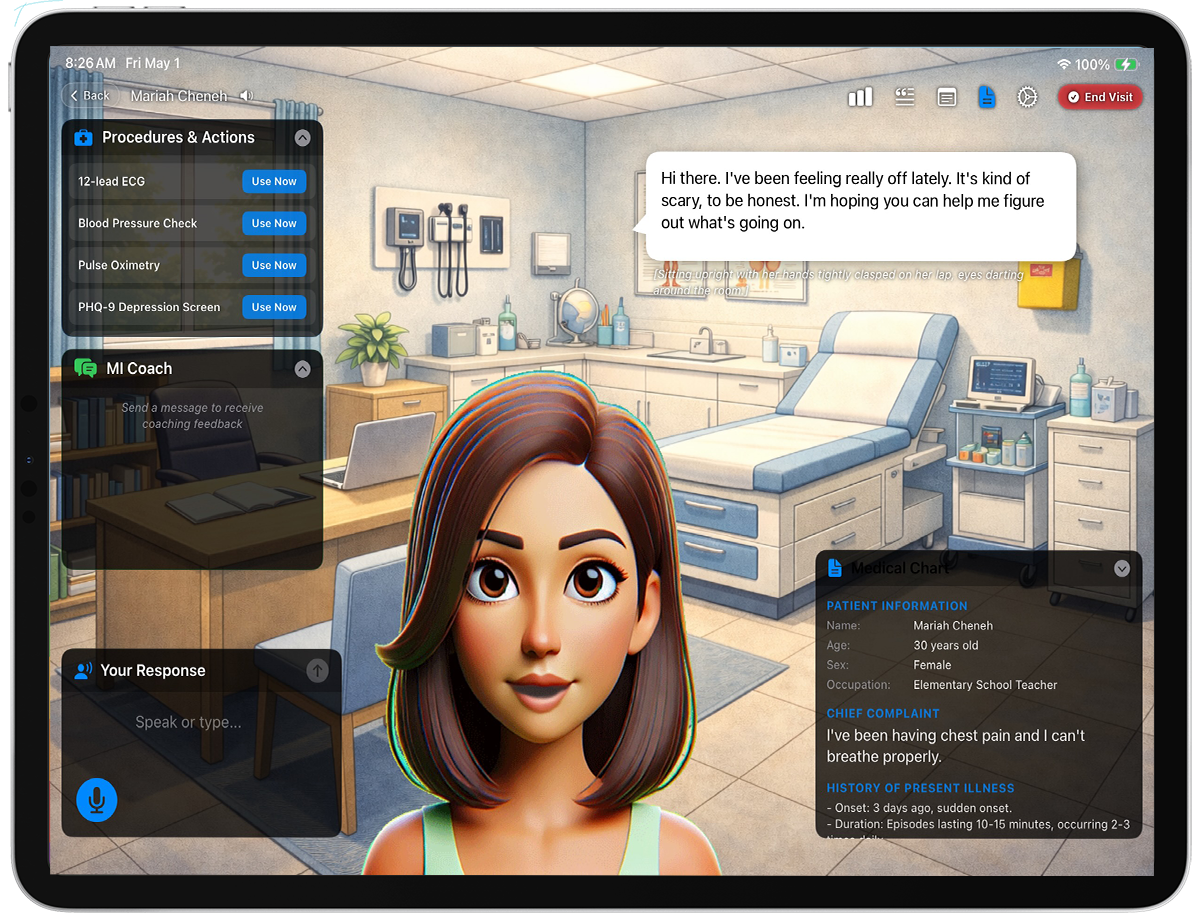
Coaching that stays on the iPad
Real-time feedback on interviewing technique, generated by Apple's on-device model. Choose Motivational Interviewing or the Calgary‑Cambridge Guide. What the learner says is evaluated locally and sent nowhere.
Attention tracking
Optional, and off until a learner turns it on. The TrueDepth camera estimates which part of the screen holds their attention, so a debriefing can show whether they were looking at the patient or at the chart. No image or video is ever created.
Speak, don't type
Dictate to the character using Apple's on-device speech recognition, so an encounter feels like a conversation rather than a chat window.
No account for learners
Students never sign up. An instructor issues an access code, and everything recorded about the work is stored against that code, not a name, email, or student ID.
For instructors and administrators
Case authoring, access codes, rosters, and reporting live on the Figment web platform. Sign in there from a computer to manage your programme; the iPad app is for learners running encounters.
If you'd like Figment at your institution, or need help with codes you already have, write to info@figmenthealth.com.
An educational tool, not a medical device
Figment SimCare presents fictional characters for communication practice. It is not a medical device, is not FDA cleared, registered, or approved, and must not be used to diagnose or treat anyone. All clinical content is invented for teaching, and nothing in the app is a substitute for supervised clinical training.